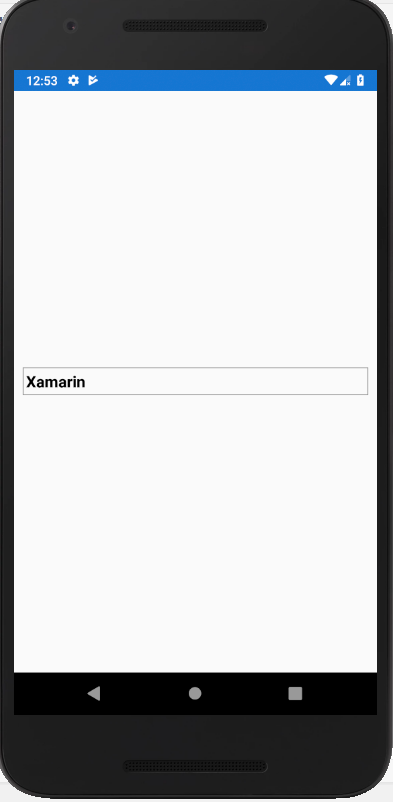
Xamarin.Forms Borderly Picker
Hello, When i develop an application with Xamarin.Forms, I need to put a picker and picker has different design in the Android and iOS. I want to show picker like in the iOS. For that i need to write Custom Renderer for the Android and iOS.
Firstly, in the portable i create a class which name is CustomMyPicker and i inherit from Picker.
public class CustomMyPicker : Picker
    {
    }
After that, i create class in the Android. The class name is CustomPickerRenderer. Here is the codes that i wrote;
public class CustomPickerRenderer : PickerRenderer
    {
        CustomMyPicker element;

        protected override void OnElementChanged(ElementChangedEventArgs<Picker> e)
        {
            base.OnElementChanged(e);

            element = (CustomMyPicker)this.Element;

            if (Control != null)
            {
                Control.Background = AddBorderToPicker();
            }

        }

        public LayerDrawable AddBorderToPicker()
        {
            ShapeDrawable pickerBorder = new ShapeDrawable();
            pickerBorder.Paint.Color = Android.Graphics.Color.Gray;
            pickerBorder.SetPadding(10, 10, 10, 10);
            pickerBorder.Paint.SetStyle(Paint.Style.Stroke);
            pickerBorder.Paint.StrokeWidth = 5;

            Drawable[] layers = { pickerBorder };
            LayerDrawable layerDrawable = new LayerDrawable(layers);
            layerDrawable.SetLayerInset(0, 0, 0, 0, 0);

            return layerDrawable;
        }
    }
The same thing, I did for the iOS. I create a class which name is CustomPickerRenderer. I did not so much thing in the iOS because design already looks good.
public class CustomPickerRenderer : PickerRenderer
    {
        protected override void OnElementChanged(ElementChangedEventArgs<Picker> e)
        {
            base.OnElementChanged(e);

            var element = (CustomMyPicker)this.Element;
        }
    }
Now, I will show the how to use this custom picker in a view. For that we need the specify where the class is.
xmlns:custom="clr-namespace:CustomPicker.CustomRenderers"
Now, I added the picker.
<StackLayout Margin="10">
        <custom:CustomMyPicker Title="Xamarin"
                               TitleColor="Black"
                               VerticalOptions="CenterAndExpand"
                               HorizontalOptions="Fill"
                               FontAttributes="Bold">
            <custom:CustomMyPicker.Items>
                <x:String>Custom</x:String>
                <x:String>Renderer</x:String>
            </custom:CustomMyPicker.Items>
        </custom:CustomMyPicker>
    </StackLayout>
Here is the output of screen;